


Word on the street is that GNOME's preferences/administration "capplets" are going to get an overhaul, although it won't be ready for the 2.16 release.
While the specifics are still up in the air, it looks like there's going to be a fair amount of the capplets grouped together. Rodrigo Moya's initial proposal looked like this:
If you had to ask me, I'd say that judging by a few similar discussions I've read, the new "preferences/administration" would maybe end up looking like the following: Display, Input Devices, Sound and Multimedia, About Me, File Associations, Accessibility, and Localization. (Note: This is almost complete speculation.)
Now, by the time development starts rolling on this, the whole "preferences/administration" interface may have been blown away in favour of the "GNOME Control Center" or have at least a different interface style (compared to the menu method used now.) Since it looks like the preferences and administration menus might be merged, I'd bet that a bigger redesign and reorganization like this is the most likely thing to happen.
If you'd like to get a more in-depth glimpse of the ideas that people are throwing around, check out "Preferences Revisted" on GNOME Live.
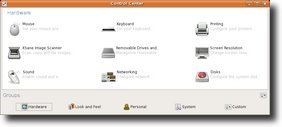
(I should also mention Ubuntu Control Center, which is an answer to Novell's control center in their SUSE Linux Enterprise Desktop 10. It'll be interesting to see what the GNOME guys do if Ubuntu ever decides to switch over officially to the Ubuntu Control Center...)
While the specifics are still up in the air, it looks like there's going to be a fair amount of the capplets grouped together. Rodrigo Moya's initial proposal looked like this:
* about-me
* at-properties
* a11y keyboard, keyboard and keybindings: merge them in one single
Keyboard capplet
* background, display, font, mouse?, theme switcher, ui-properties,
windows: merge them into a single 'Display' capplet
* default apps
* file types, mime-type
* localization
* network, url-properties
* sound: add video device setup and call it Multimedia??
If you had to ask me, I'd say that judging by a few similar discussions I've read, the new "preferences/administration" would maybe end up looking like the following: Display, Input Devices, Sound and Multimedia, About Me, File Associations, Accessibility, and Localization. (Note: This is almost complete speculation.)
Now, by the time development starts rolling on this, the whole "preferences/administration" interface may have been blown away in favour of the "GNOME Control Center" or have at least a different interface style (compared to the menu method used now.) Since it looks like the preferences and administration menus might be merged, I'd bet that a bigger redesign and reorganization like this is the most likely thing to happen.
If you'd like to get a more in-depth glimpse of the ideas that people are throwing around, check out "Preferences Revisted" on GNOME Live.
(I should also mention Ubuntu Control Center, which is an answer to Novell's control center in their SUSE Linux Enterprise Desktop 10. It'll be interesting to see what the GNOME guys do if Ubuntu ever decides to switch over officially to the Ubuntu Control Center...)

 Posted in: