Last-exit Player and Last.fm

Last-exit is an audio player for the handy last.fm music service. If you have a free Last.fm profile, the player will stream music from artists that it thinks you will like based on your past listening history.

The website for Last-exit gave me a good chuckle when I saw it the first time. If you click the "magic stuff", you'll see some nice screenshots as well. That brings me to my next point: The user interface on this application absolutely kicks ass. It's simple, organized, functional, and looks great.

So what's Last.fm?
Last.fm is a useful website/service for finding artists similar to those that you already listen to. If you use an audio player that has last.fm support, last.fm will automatically build up a profile of what music you listen to. If you login to the last.fm website, it'll show you stats on what you've been listening to, and it'll help you find similar artists. Banshee takes it a step further by integrating some of these stats directly into the player's UI.
Sometimes it tells you about artists that you already know about, but it's usually a great way to expand your taste in music. Personally, I've found it pretty useful in my experience with it, but there's always some interesting bias in the statistics it gives you. For instance, the first few songs that appear in Banshee or Rhythmbox for me get played disproportionately more than other songs in my collection simply because they're at the top and more accessible - not because I like them more. If you keep these sorts of things in mind, it's pretty interesting to see if the music you listen to the most is actually the music you like the most.

Give it a shot!

Edit: A .deb for Ubuntu Dapper is available here. (.DEB updated to version 2, but if you want to run the newer version 3, download the sources.)

Banshee 0.11 Preview

Update: Banshee 0.11 has been released! I've posted instructions on how to install Banshee 0.11 as well.

Music players in Linux have been undergoing a sort of renaissance over the past year. Older programs such as Rhythmbox and Quod Libet have undergone serious active development adding useful new features. Newer contenders like Banshee and Listen have continued to add features in a friendly competition to create the best desktop music player.

In keeping with this competition, the next release of Banshee (version 0.11) is going to have some spiffy new (and long awaited) features.

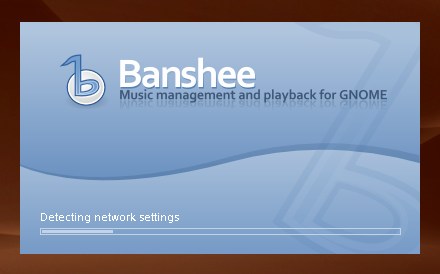
The change is the new splash screen, which has a nice little progress bar on it:


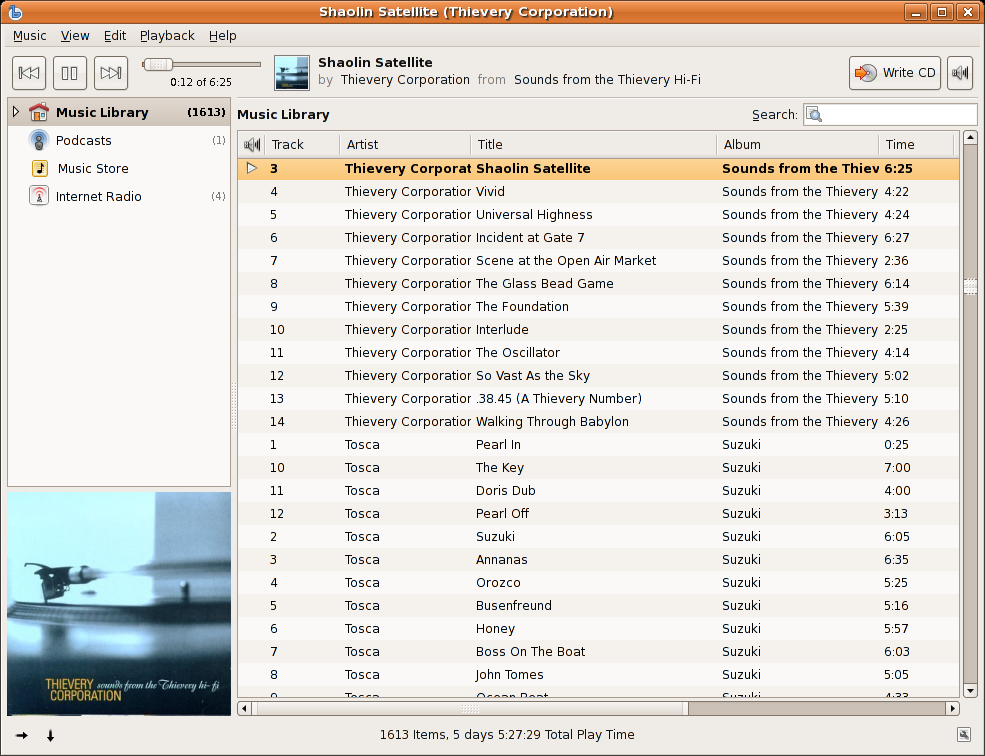
Once Banshee's done loading, you'll recognize the usual simple layout, but it's got a few new additions on the left-hand side:


That's right: Banshee's going to have podcast support, internet radio support, and iTunes Music Store (ITMS) support all in one go!

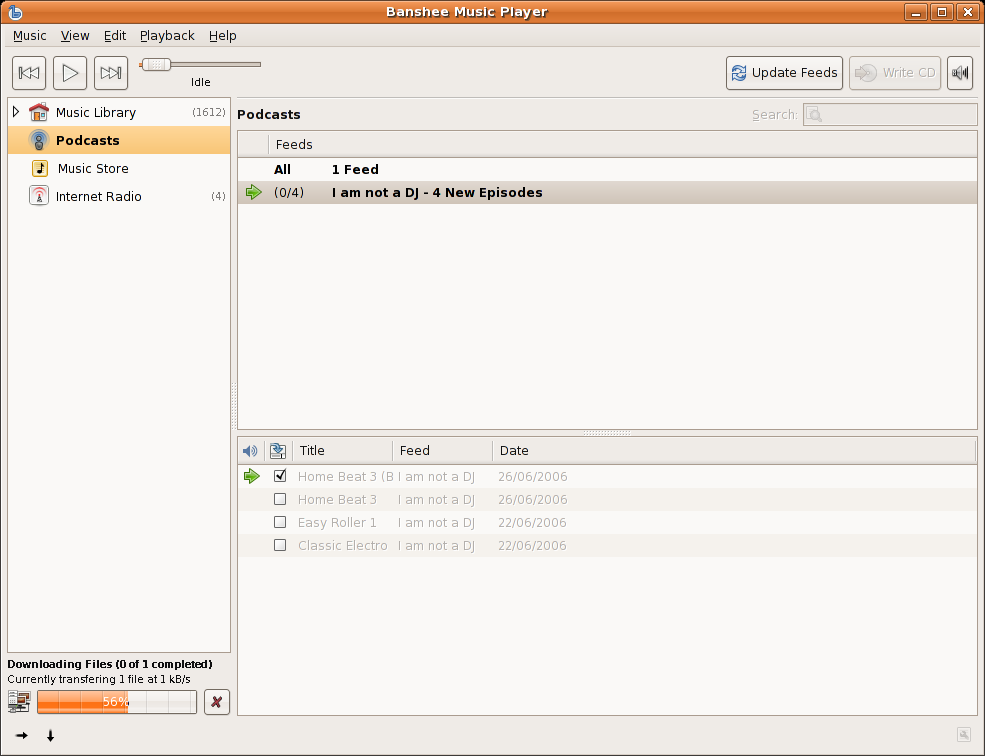
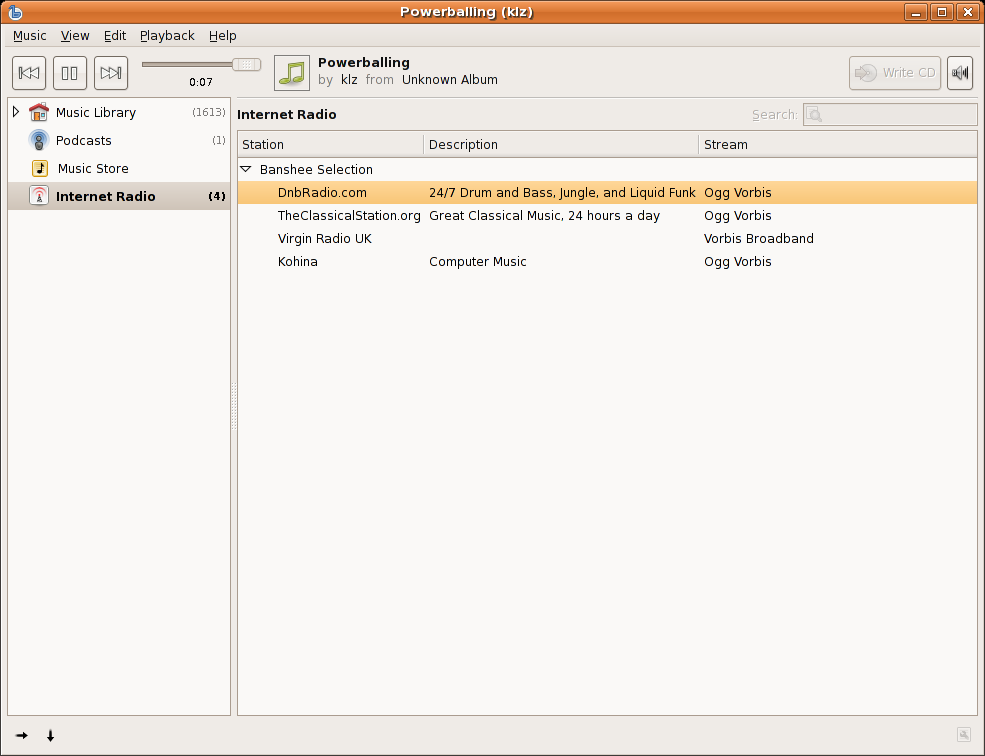
Each of these new features is integrated via plugins, but thanks to the clever design of the plugin architecture, each plugin's features are integrated seamlessly into the user interface:


Podcast support in Banshee


Streaming internet radio in Banshee


ITMS support in Banshee


I haven't personally tested buying anything through ITMS in Banshee, but it looks like it "just works".

This is the Banshee I've been waiting for. With the upcoming 0.11 release of Banshee, I think the project has finally have started to reach maturity, as it's now flush with tons of unique features that are seamlessly integrated into the beautiful user interface.

Lastly, here's a list of all of the major features that'll be included in Banshee's next release:

  • Audioscrobbler/Last.FM support
  • Music sharing (DAAP)
  • Metadata Searching (Automatic covert art and metadata downloading)
  • Multimedia Keys support
  • Podcast support
  • Music Recommendations (through Last.FM)
  • Smart Playlists
  • Streaming Internet Radio
  • iTunes Music Store (ITMS) support
  • Wikipedia/Lyrics support (lookup artist info and lyrics)
  • Full iPod sync support with transcoding
  • CD Playback and Ripping

Drooling yet?
I most certainly am.
:)

Novell's SLED 10, Gimmie, Evolution

Watch out Ubuntu: SLED 10's in town

Novell has been creating buzz with their new SUSE Linux Enterprise 10.
Why all the buzz?
Watch these videos and you'll find out. Pretty nifty stuff going on there - SUSE 10 has the potential to do very well in the business desktop market.
OS News was pretty impressed by the prerelease, and Nat Friedman has some links to and quotes from SLED 10 reviews that are very interesting as well.
Check them out!
I'd be willing to install SUSE 10 on my home PC, but I'm not sure what the package situation is like for SUSE. I really like having 19,000 packages available to me through Synaptic - It'd be hard to give that up. Maybe SUSE 10 at work, Ubuntu at home?

First release of Gimmie

Gimmie (aka. Gimmebar) got its first release recently. It's a replacement for GNOME's panels which people seem to be fairly interested in. There's a great presentation (PDF) summarizing where the development is headed and explaining the concepts behind it. I haven't personally tried Gimmie yet, but its coolness factor is steadily increasing. One day, Gimmie, one day.

Evolution evolution?

Dave Richards has a plugin architecture in mind for Evolution that would "[make] evolution cool". If the ability to download and display movie showtimes in Evolution isn't cool, then I don't know what is. The architecture is still early in development, so we'll just have to hope that this one matures.

HOWTO: Scream "I know nothing about Linux"

I'm sure this happens to other people on a regular basis too, so I guess it just goes to show that there's tons of "computer experts" out there who don't have a clue when it comes to Linux (or maybe just haven't read ANY tech news site on the net in the past 8 years):

Yesterday someone asked me at work what version of Linux we were running on one of our servers.
I told him, "Ubuntu 6.06".
He replied, "Why don't you run Redhat? Why are you using such an obscure version??? I've never heard of that..."

*sigh*

I love people who know absolutely nothing about Linux, but like to throw the term "Redhat" out there just to look cool, but end up looking like an ass anyways.

The revolution's got a ways to go yet. ;)

Ubuntu 6.06 and NTP: The revelation of suggesting packages

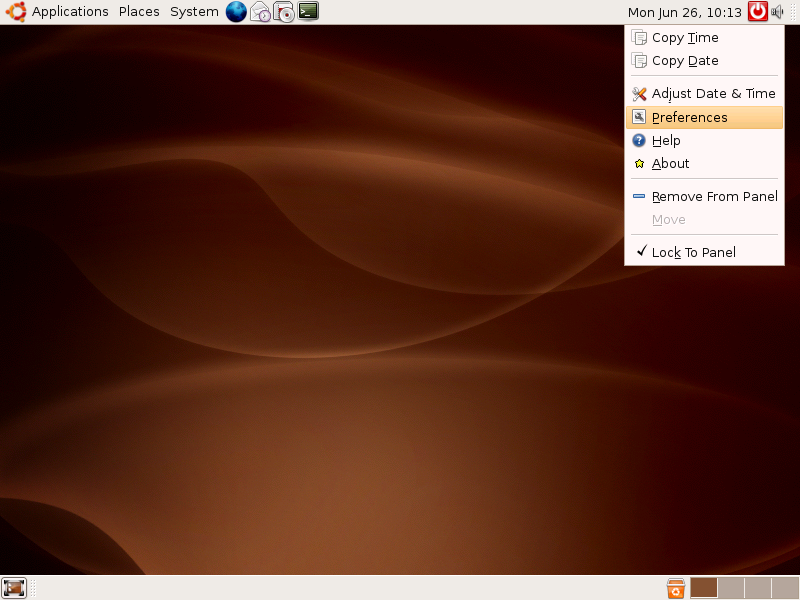
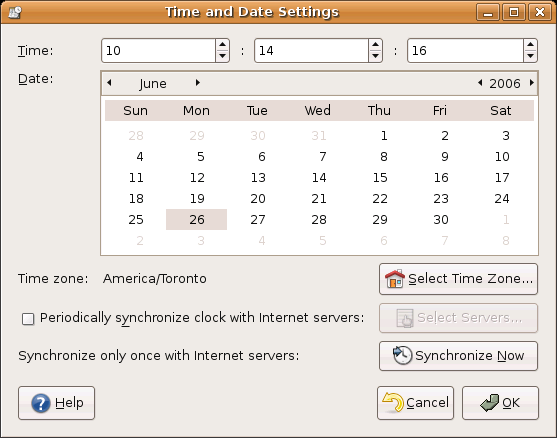
I was playing around with my system the other day, and I stumbled across the "Adjust Date & Time" dialog in Ubuntu/GNOME:


At first glance, this was a beautifully designed dialog. Every button has an icon, and the layout is very clean.
I noticed the option to "Periodically synchronize clock with Internet servers", which is something that I thought my Ubuntu machine did already. After checking off the box beside it, I was presented with something that I made my jaw drop:


That's right - Ubuntu knew I didn't have the right package(s) installed, explained to me what I needed to do, and gave me an option right there to do it.
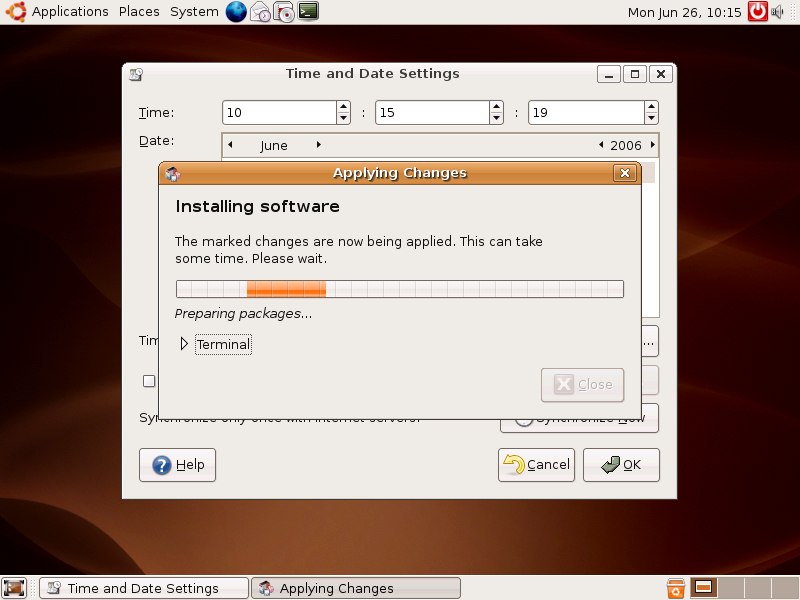
After clicking "Install NTP support", I got exactly what I had hoped for:


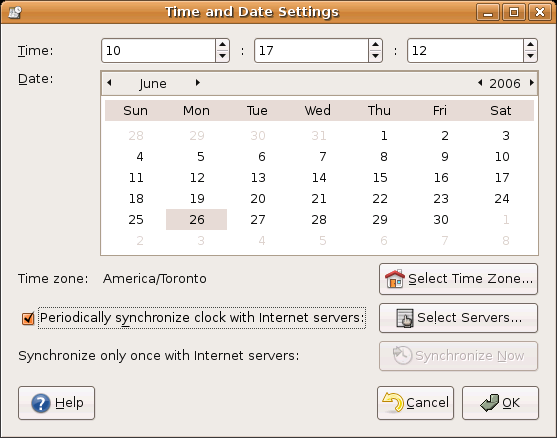
Granted, after it installed the NTP packages, I did have to close the date/time dialog and open it again for it to detect the packages (it's a small bug), but the functionality was there nonetheless.

Why did I get excited by this?

An intelligent package suggestion mechanism ("suggest/install a package") should be the next killer feature for Ubuntu on the desktop. Imagine for a moment, you've just installed Ubuntu on your friend's computer. They try to download and play an MP3, but are given a cryptic error message whenever they try to play an MP3 file. They don't know what package to install, or even know that there is a package to install to fix this. Now imagine that they were given a suggest/install a package message instead. They would know exactly how to fix their problem, and could do it with the click of a button.

Why hasn't this been worked on before?

The importance and scope of this concept are huge. For example, if a user tries to open a 3d model file and doesn't have a program installed that can view it, they could be presented with a suggest/install a package dialog that allows them to install a viewer immediately.
Taking things a step further, if someone plugs in a piece of hardware that is supported by some extra modules that need installing, they could be presented with the same dialog, but would instead help them download the required package(s).
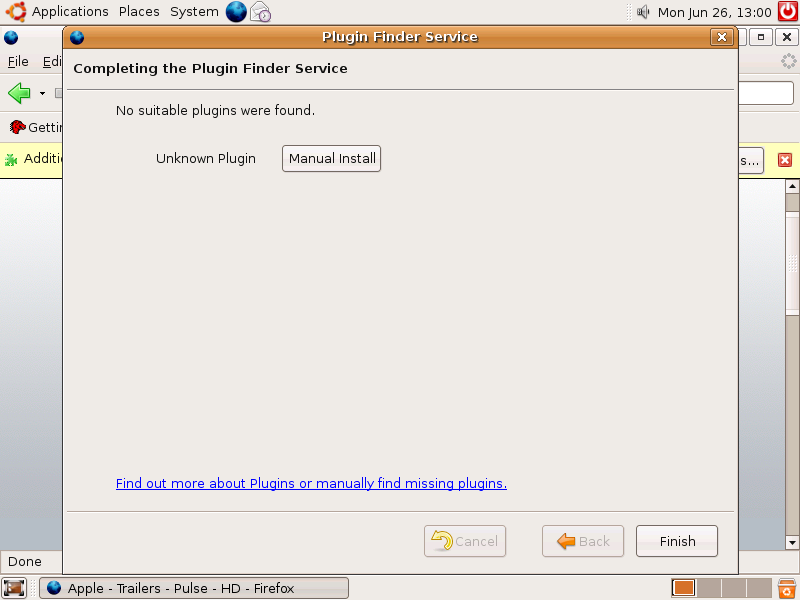
Lastly, imagine a new out-of-the-box user cracks open the Apple Trailers site in Firefox. They try to view a movie trailer, and Firefox pops up a suggest/install a package dialog that helps the user download the Totem plugin and/or the required gstreamer packages to playback Quicktime trailers properly.

What are all these situations like right now?
  • When a user clicks a file that doesn't have a viewer/handler installed, they get a message saying "Couldn't display....". To view the file, they'll have to know beforehand which package to install, or they'll have to consult the web.
  • When someone plugs in a piece of hardware that isn't recognized, and just needs some packages installed for it to work, they'll have to consult the web to figure it out.
  • When someone tries to view a trailer from the Apple Trailers site in Firefox, they are prompted by the "Plugin Finder Service" dialog, which tells them that "No suitable plugins were found." You can, in fact, watch a trailer from this site with the "totem-gstreamer-firefox-plugin" package installed (you might need the win32 codecs installed too, but I don't remember).

But there is hope:

What can you do to help?
  • Contribute to these Ubuntu specifications, and help bring them to the attention of developers.
  • Better yet, if you have the time and the skills, write some code!

News Tidbits: New kernel, Edgy Stuff, Alky

Here's some interesting articles I've found over the past few days:

  • Jorge Castro mentions some possible features that are being worked on for Edgy.
  • Linux Watch gives an overview of the new 2.6.17 kernel, which include a nice speed boost for EXT3 filesystems (that's most people), the groundwork for better WiFi support (don't we keep hearing that?), and a cool SMP detection feature...

... and here's a piece of software to keep an eye on:

Alky

Alky is "is a tool that allows you to convert a Windows executable to a Mac OS X or Linux binary." It's an alternate approach of getting software to run on another platform (as opposed to the WINE approach, which they make clear on their site.) I was a bit skeptical at first, since they say they're "focused on high-end gaming at the moment". High-end gaming is the area where it's hardest to do any cross-platform chicanery because games often use a bunch of different advanced APIs (think DirectX, OpenGL, OpenAL, EAX, etc.), which can be tough to reimplement or work around.
However, later down their page I noticed:
Although it's a very new project, it will already convert (nearly) any Windows executable into a Mac OS X executable and attempt to run it, with some success and a fair amount more debug data.

Pretty good. I'm keeping an eye on this one.